Someone on your team fixes the code review skill. It now checks for migrations that lock tables. The fix lands in their ~/.claude/skills, and nowhere else. Three teammates keep reviewing with the old one, a second repo has its own copy from March, and nobody can say which version a given agent used last week.
Instructions for agents drift the same way prompts did before anyone versioned them. Copies in home directories, copies in repos, no history, no way back.
What shipped
SuperPrompts now holds skills as well as prompts. A skill is the Agent Skills format: a folder with a SKILL.md and whatever files it uses, such as references/, scripts/ and assets/. Each organization has one skill library, shared by every member and every agent they connect.
Skills get the treatment prompts already had. Every save is a version identified by a hash. A new skill is a draft that no agent can see. You publish a version when you mean it, and production points at that one until you move it.
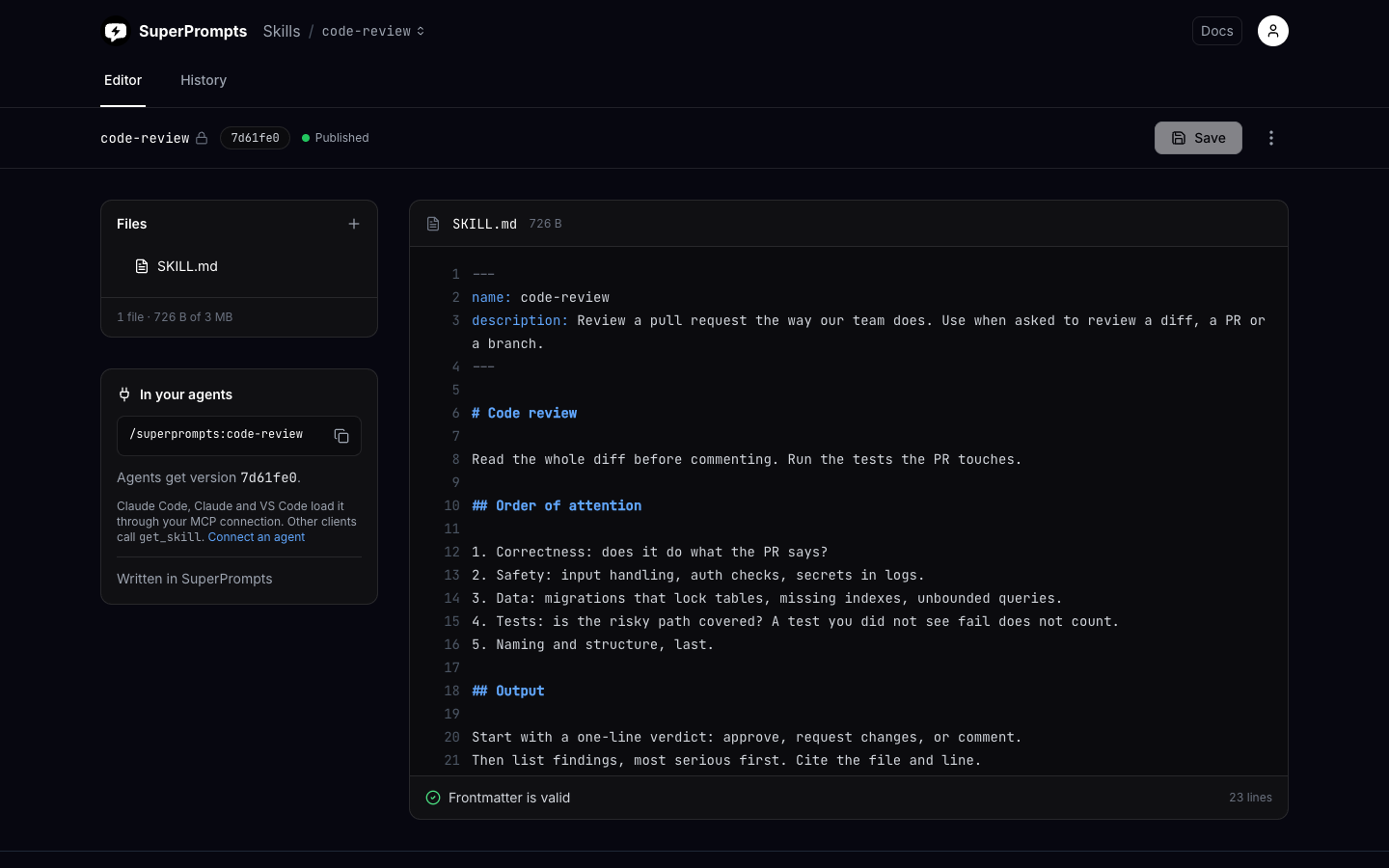
The panel on the left of the editor shows what agents get: the command, and the version that command loads.
How skills reach each client
Skills travel over the same hosted MCP server as prompts. Connect with OAuth, approve, and the agent sees the production version of every published skill. Three clients load them natively through the MCP Skills extension. Everything else reads them with two tools.
- Claude Code: native, as
/superprompts:<name>. Public beta since 2.1.331. Claude Code docs - Claude: native, in public beta for connectors. On by default on Pro, Max and Ultra. Anthropic announcement
- VS Code with GitHub Copilot: native, on by default since 1.147, with consent for each server. Microsoft announcement
- Other MCP clients, Cursor included: the agent calls
list_skillsandget_skill. MCP docs
In Claude Code's default auto mode a classifier decides whether a skill loads and you see no prompt. Manual and acceptEdits modes ask first. More in the skills docs.
Four ways in
- Write it in the dashboard. New skill, then Write one. Saving creates a version, and the skill stays a draft until you publish.
- Upload a folder or a .zip. From New skill, or by dropping it anywhere on the Dashboard. Hidden files,
node_modulesand OS leftovers are skipped, and the upload lists what it skipped. - Import from skills.sh. Search the public directory, and the preview shows the files plus the audit verdict from each partner that audits the skill: pass, warn, fail or not audited. Import up to 10 at a time. They arrive as drafts unless you tick Publish right away, and an import never publishes over a skill you already have. SuperPrompts shows the verdicts and does not run the audits, so a clean verdict is not a review.
- Push it from your agent.
save_skilluploads a whole folder as a draft. In Claude Code you can run theimport_skillsprompt, which reads the skills on your machine, skips dotfiles and secrets, saves each one as a draft and asks before it publishes anything. The server refuses.envfiles, private keys and similar credentials on every path.
Versions, publish and rollback
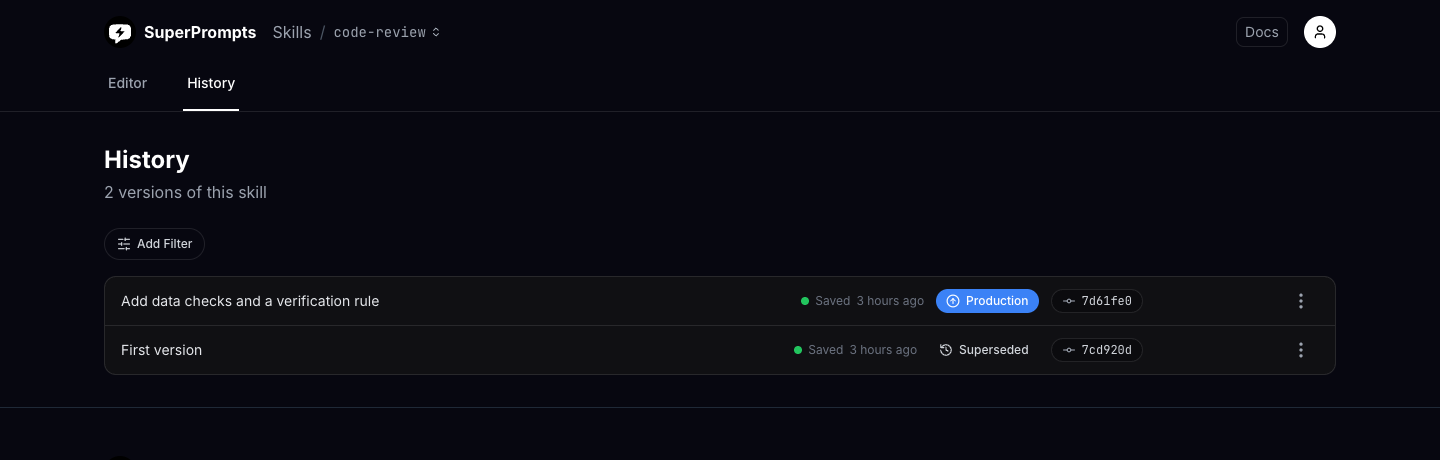
History lists every version with its message and hash. Publishing a version moves production to it. Publishing or restoring an older version rolls production back in one click, and the rollback is recorded.
Every change from the dashboard, the API and MCP also lands in the audit log under Settings → Activity: who did it, through which app, and which versions it moved between. Entries are kept for 90 days, and the log never holds file contents.
Prompts are still first class
Skills are for the agents your team works with. Prompts are for the agents you ship. Your app reads the published version of a prompt over REST or the superprompts Node SDK, which fills in {{ variables }}. You edit and publish in the dashboard, and the app serves the new version with no redeploy.
One difference matters for security. Skills are reachable only through an OAuth connection. A project API key does not reach them, so a key sitting in CI cannot read or change your skills. Prompts keep working with API keys as before.
Pricing
The Free plan includes 5 skills, 1 project, 5 prompts per project and 60 API requests a minute. Pro is €9.99 a month with no limit on skills, projects, prompts or requests. On Free, an organization that goes over keeps its oldest 5 skills and the rest are locked, not deleted. Each skill file an agent reads counts as one request, so on Free a burst of large skills can hit the limit.
How to start
The quickest way in is Claude. Add SuperPrompts to Claude, sign in, and your published skills appear. Claude loads them on the Pro, Max and Ultra plans. From a terminal:
claude mcp add --transport http superprompts https://superprompts.app/api/v2/mcpRun /mcp, pick SuperPrompts and sign in. Then ask the agent to upload the skills in ~/.claude/skills, review the drafts in the dashboard and publish the ones you want everyone to have. They show up as /superprompts:<name>.
What is still beta
Native skill support is beta in every client listed above, and the behavior is theirs, not ours. There are no per-skill permissions yet: any member of an organization can save and publish skills, and so can any agent a member has connected. A skill is instructions an agent follows, and it can include scripts, so read one before you publish it. You can cut an app off under Settings → Connected apps.
Read the skills docs, or sign up. The Free plan needs no card.