SuperPrompts 2 is out.
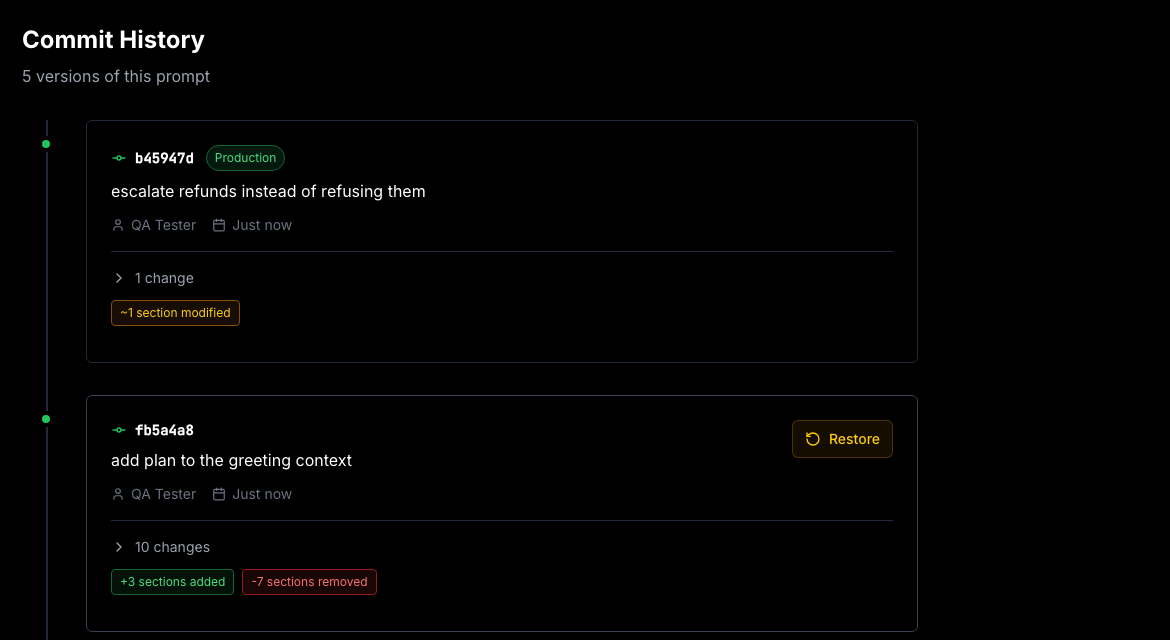
Say you're in Claude Code and you notice the support prompt still tells the model to refuse refunds, two months after that policy changed. You ask for the fix the way you'd ask a colleague: escalate refunds instead of refusing them, then publish. The agent pulls the prompt, rewrites the rule, saves a version with a message on it, and moves production onto the new one. Your app serves the new wording on its next request.
That's the hosted MCP server, and it's the change we'd point at first. The rest of this release is underneath it: prompts that take arguments, versions you can name, and an API that writes.
What's actually in your request path
Publishing without a deploy means something fetches the prompt at runtime, so it's fair to ask what that costs you.
The Node SDK keeps an in-memory cache, five seconds by default. A busy endpoint fetches every few seconds, not on every request, and the rest are a hash lookup. You control the TTL: raise it if you'd rather trade freshness for fewer calls, set it to zero if you want every read to be live. Server side, published versions are cached and the cache is dropped the moment you publish, which is why a publish shows up on the next request instead of whenever something expires.
If you can't tolerate the dependency in a request at all, fetch at boot and hold the string. Nothing about the design requires you to call us on the hot path. We'd rather say that than pretend a network call is free.
Five tools
list_prompts, get_prompt, create_prompt, update_prompt, publish_prompt. One setup command:
claude mcp add --transport http superprompts https://superprompts.app/api/v2/mcp \
  --header "x-api-key: sp_YOUR_PROJECT_KEY"
Then you ask for what you want:
> Refunds should be escalated, not refused. Update the support prompt and publish it.

  update_prompt   -> version 9f2a1c0
  publish_prompt  -> production
Anything the agent changes lands in the same history as an edit you'd make by hand. Same commit message, same diff, same one-click rollback. The key reaches one project and nothing else, so an agent working on your support bot can't touch the prompts behind your billing emails.
Cursor, Claude Desktop and VS Code use the same endpoint. Setup for each is in the MCP docs.
Prompts that take arguments
Most prompts have a few values that change per request. A customer name, a plan tier, whichever tenant you're serving. Until now you patched those in after fetching the prompt, which works right up until someone edits the prompt and your substitution code doesn't hear about it.
Write {{ name }} anywhere in a section and it becomes a variable. The editor picks them up as you type.
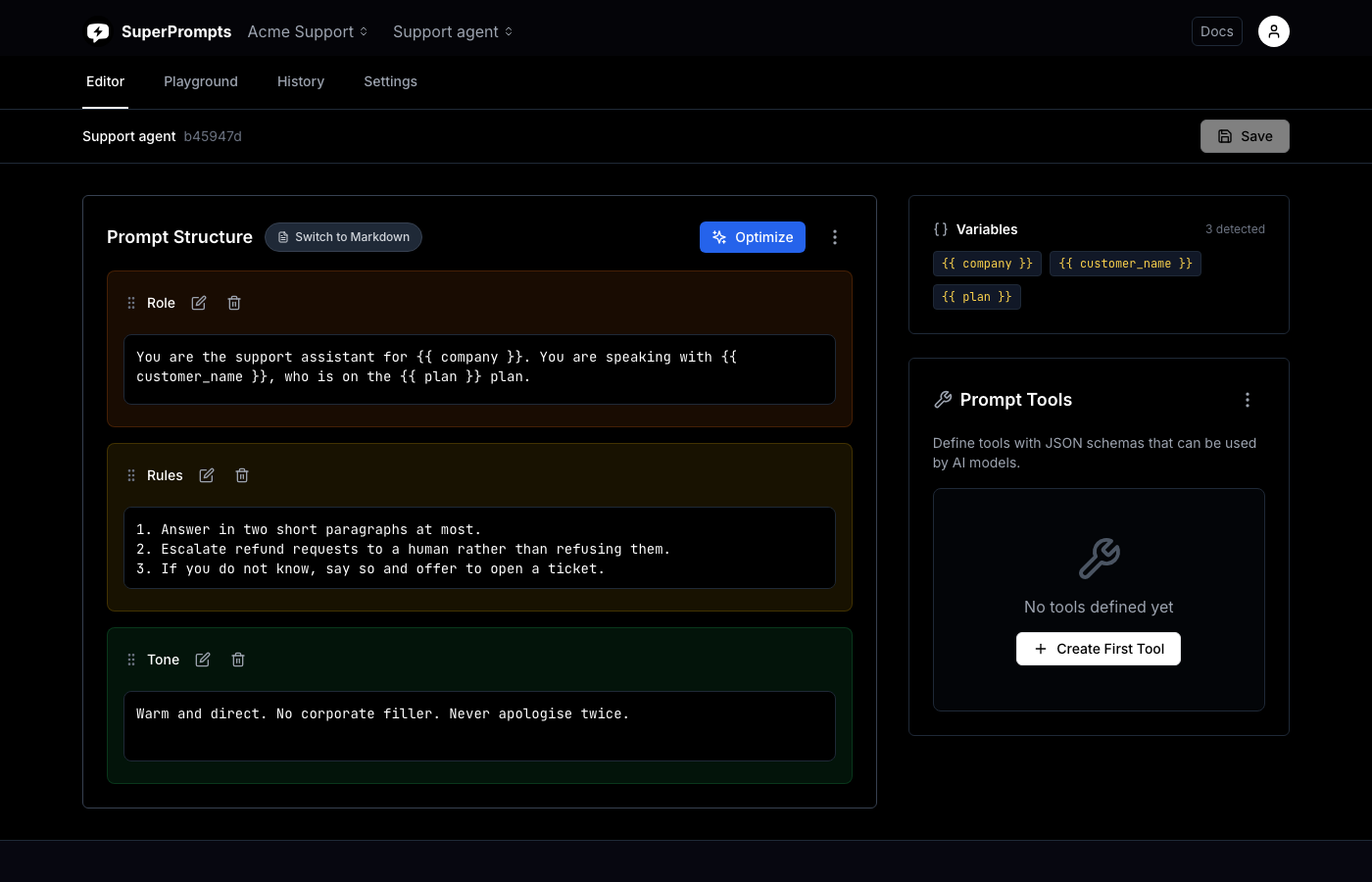
The API hands the list back with the prompt:
{
  "prompt": "<role>You are the support assistant for {{ company }}...",
  "variables": ["company", "customer_name", "plan"],
  "version": "b45947d...",
  "label": "production"
}
The SDK substitutes them. Strict mode turns a missing value into an exception instead of a prompt that ships with {{ customer_name }} still in it:
const { prompt } = await sp.getPrompt('support-agent', {
  variables: { company: 'Acme', customer_name: user.name, plan: user.plan },
  strict: true
});
It's a subset of Mustache on purpose. If you leave, your prompts are still prompts.
Asking for a version by name or by hash
This is the part that makes the rest safe, and it's easy to skim past.
Every save has always produced a version, addressed by a content hash the way a git commit is. What's new is that you can ask for a particular one. Production is the default. latest gets you the newest saved draft. A hash prefix gets you exactly that version, forever.
curl https://superprompts.app/api/v2/prompts/$ID -H "x-api-key: $KEY"
curl "https://superprompts.app/api/v2/prompts/$ID?version=latest" -H "x-api-key: $KEY"
curl "https://superprompts.app/api/v2/prompts/$ID?version=b45947d" -H "x-api-key: $KEY"
So staging reads latest and production reads the published version, from one prompt id, with no second copy drifting out of sync. And when you pin a hash in a test, a colleague publishing halfway through your run can't change what you're asserting against.
The API writes now
It used to read and nothing else. There are four endpoints:
# create
curl -X POST https://superprompts.app/api/v2/prompts \
  -H "x-api-key: $KEY" -H "content-type: application/json" \
  -d '{"name":"Support agent","markdown":"# Role\nYou help {{ customer }}."}'

# save a version
curl -X PUT https://superprompts.app/api/v2/prompts/$ID \
  -H "x-api-key: $KEY" -H "content-type: application/json" \
  -d '{"markdown":"# Role\nYou help {{ customer }} quickly.","message":"be brief"}'

# publish it
curl -X POST https://superprompts.app/api/v2/prompts/$ID/publish \
  -H "x-api-key: $KEY" -H "content-type: application/json" \
  -d '{"version":"latest"}'
Which means a prompt can be created, versioned and shipped from a CI job. Save the same content twice and you get the hash you already had rather than a second identical entry in the history.
Everything above works from any language
There is one SDK, for Node. Everywhere else you make the same GET, and the write endpoints are the same three calls shown above. Python with nothing installed:
import json, os, urllib.request

req = urllib.request.Request(
    "https://superprompts.app/api/v2/prompts/support-agent",
    headers={"x-api-key": os.environ["SUPERPROMPTS_API_KEY"]},
)
with urllib.request.urlopen(req) as res:
    data = json.load(res)

completion = OpenAI().chat.completions.create(
    model="gpt-5",
    messages=[
        {"role": "system", "content": data["prompt"]},
        {"role": "user", "content": message},
    ],
)
data["variables"] is the list of names the prompt expects, so you can fill them with str.format or fail loudly when one is missing. The SDK is a convenience, not the interface.
60 requests a minute, free
| Before | Now | |
|---|---|---|
| Prompts | 1 | 5 |
| API requests | 1 per minute | 60 per minute |
| Projects | 1 | 1 |
One prompt and one request a minute was, in hindsight, a strange thing to hand someone and call a free tier. The new numbers are enough to run something real.
Nothing structural is behind the paywall. Versions, publishing, rollback, the REST API, the SDK and the MCP server are all on the free plan. Pro buys you more than one project, more than five prompts, teammates, no rate limit, and the playground for comparing providers.
Why this is a 2, and what it means for v1
Four things changed about how the product is used: what a prompt can contain, which version you get back, who is allowed to write one, and where you can do it from. The API moved to /api/v2 and the SDK moved with it.
/api/v1 is frozen. Not deprecated on a timer, frozen: it serves the published version with the guard appended, the way it always has, and it ignores the new query parameters rather than behaving differently. It now sends a Deprecation header so you can find callers in your own logs. There's no removal date, and if one is ever set you'll hear about it here and by email long before it happens. API versions has the details.
Evaluations are gone
The evaluation system has been removed, along with its pages, its API routes and its stored data. If you had evaluations set up, they aren't there any more.
If you have a pmpt_ id in your code
OpenAI turns off its v1/prompts API on 30 November 2026. Anything still referencing a pmpt_ id stops working that day, which is why a lot of people are looking at this category right now.
Variables and version pinning landed partly because that migration needs both. The guide is three steps and about an afternoon for a typical application, and what you end up with isn't tied to a single model vendor.
What we still don't have
No tracing. No eval datasets. No named environments beyond production and latest. No webhook when you publish. No SDK beyond Node, and none planned while a GET does the job. If those are the things you need, Langfuse and PromptLayer are good tools, and our comparison pages say where they beat us.
The free plan is enough for a real side project and there's no card. Start here, or read the docs first.